Characters

SkinForgeToolFree tier · Full $29.99Betav0.4.0

Scars, tattoos and marks, exactly where you want them.

Stamp a mark onto your character in 3D, set its age, its colour and its wear, then bake it into the textures. Every layer comes off again, and the originals are never touched.

Coming soon on Fab, as part of the Characters bundle: MeshForge, MeshForge Garment and SkinForge.

The film

Every mark, on the skin.

Ink, scars, paint and cyberware, stamped, aged and baked on one character.

Made with SkinForge

Made in the skin, not painted on it.

Every picture on this page is one MetaHuman in one light, with SkinForge marks baked into his own textures.

A man’s face in warm low light, white clay dots across his brow and red ochre finger stripes on his cheek
A close-up of a glowing cyan circuit running past a man’s eye
A man’s bare back and shoulder in warm low light, a dragon back piece across it and a portrait on the upper arm

What you can do with it

SkinForge

From bare skin to a back piece.

Click, and it is on the skin.

Pick a mark and click where it goes. Drag it along the surface, turn and size it with the wheel. It wraps round a shoulder or a neck at its true size, and runs across a MetaHuman’s face onto its body without a seam. Then bake it into the character’s own textures.

A man’s bare back and shoulder in warm low light
The same back with a Japanese dragon back piece and a portrait on the shoulder
OriginalBaked
SkinForge

Sixty-one marks to start with.

Ink, scars and wounds, cyber, paint and grime, skin detail.

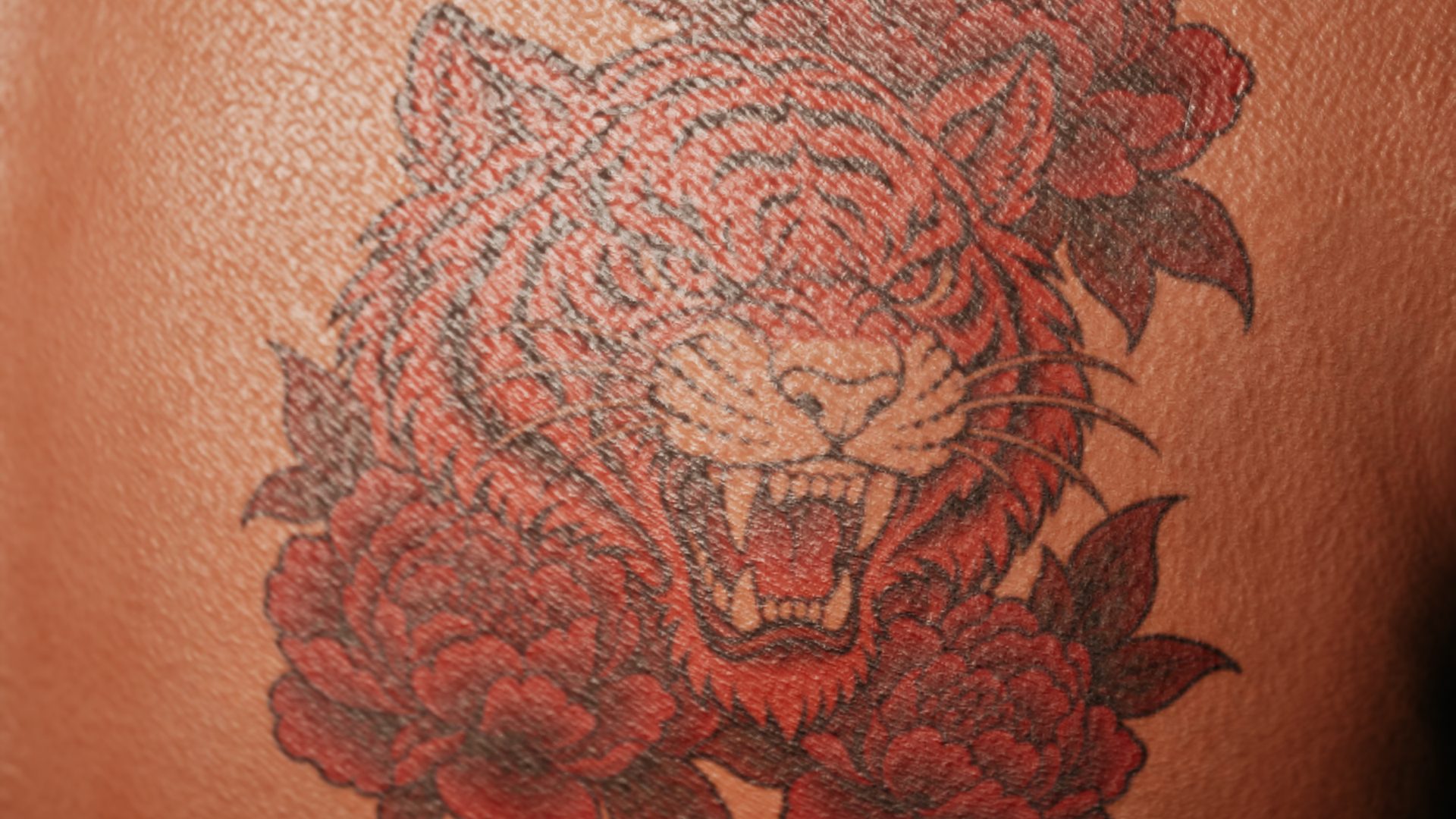
The starter library comes in five packs, every mark made for SkinForge at its real size: tattoos from fine line to a full back piece, stitched gashes and burns, jacks and glowing implants, war paint and soot, veins and sunburn. Each card here is the mark baked on the same character.

A red and black tiger with peonies tattooed on a man’s skin
A fresh stitched gash across a man’s upper arm, the black thread pulling the wound closed
A round metal data jack set into a man’s skin

Ink

Tiger and peonies01 / 16

SkinForge

A fresh session, or twenty years on.

Every mark comes with presets.

A tattoo can be fresh from the needle, healed, ten years old or faded after twenty. A cut can be a fresh wound or a pale old scar, a black eye Day 1 or Day 10. Pick a preset to start from, then move its controls until it is the mark your character has lived with.

A red koi and waves tattoo on a man’s forearm, bright and fresh, the skin around it faintly red
The same koi tattoo faded and softened after twenty years
Fresh sessionFaded, twenty years
SkinForge

Pick the colour of the glow.

Implants that light up.

Circuits, barcodes and LEDs glow under the skin in cyan, magenta or amber, from a faint trace to a bright line. The glow is baked into its own map beside the colour, so it lights in your game the way it lights here.

A man in profile with a cyan circuit glowing down his temple
Cyan
The same man with the circuit glowing magenta
Magenta
The same man with the circuit glowing amber
Amber
SkinForge

Each mark has its own controls.

Wear, inks, age and glow, per layer.

Select a layer and it shows the mark’s own settings: a tattoo’s wear and its inks, a wound’s depth and wetness, a jack’s irritation, a circuit’s glow. Change them and the character changes at once, before anything is baked. Every channel setting is under Advanced.

SkinForge · LayerThe koi’s layer: its size and turn, its presets, its wear, its four inks.

The panel
SkinForge · Layer
A tattoo layer’s settings in the SkinForge panel: size, turn, opacity and mirror, a presets menu, wear and fresh, and four inks (colour, accent, shade and line)
What it made
SkinForge

From a fresh cut to an old scar.

One slider ages the mark.

Wounds, scars, bruises and burns carry their stages along an Age slider: fresh, scabbed, healing, healed. Move it and bake again, and the same wound has healed.

  1. A fresh red cut across a man’s jaw
    1

    Fresh wound

    Open and red, the skin around it swollen.

  2. The same cut closed and healing, pink along its length
    2

    Healing

    Closed and pink, the edges still raised.

  3. The same cut as a pale old scar through the beard
    3

    Healed pale

    A pale line where no beard grows.

SkinForge

More than colour.

Relief, shine and tissue, per mark.

Paint sits on top and catches the light, ink sits under the skin with the pores coming through it, a scar is raised and smoother than the skin around it, a port is metal. Each part is baked into the maps that need it, against the skin that is already there.

SkinForge

Day 1, and Day 4.

Bruises heal the way bruises do.

A black eye starts purple and swollen, then turns yellow and green at its edges as it fades. Set the day and bake it, so the fight in the last level shows in this one.

A close-up of a man’s fresh black eye, purple and swollen
The same black eye four days on, faded to yellow and green at its edges
Day 1
SkinForge

It follows the body.

Stamped in 3D, at its true size.

A mark is placed on the character, not on a texture sheet, so it wraps over a shoulder blade and round an arm without stretching. Size is in centimetres, so a back piece is a back piece on every character.

SkinForge

Every layer comes off again.

Bake versions, and go back to any of them.

A bake writes new copies of the textures and new materials. Your originals are never edited. Keep Clean, Scarred and Augmented side by side, put any of them on a character, and put the original back with one click.

A shaven-headed man in profile in the original textures
The same man with a glowing cyan circuit at the temple and a metal jack in his neck, baked
OriginalBaked

Editions

One SkinForge, two ways to get it.

SkinForge Lite

Free

Every feature, with every baked map capped at 2K.

SkinForge Full

$29.99

The same tool, baked at the full resolution of your character or mesh.

Lite is the whole tool, with every baked map capped at 2K. Full bakes at the full resolution of your mesh.

Extend it

More for SkinForge.

Extensions, kits, utilities and playbooks that belong with it. Each one works on its own; together they cover the whole job.

What it needs

Unreal Engine 5.8

Everything runs inside the editor.

A mesh with textures

A MetaHuman, your own character, or a skeletal prop.

Marks to stamp

A starter library of 61 marks comes with it. Bring your own images too.

Price

Free tier

Full $29.99

SkinForge Lite is free, with baked maps capped at 2K. SkinForge Full bakes at full resolution.

Beta · v0.4.0

In the Hub

The free Hub installs SkinForge, keeps them up to date, and gets new versions to you first. Sign in with a free account and it installs as Lite. Buy Full and the same install becomes Full at the Hub’s next licence check: nothing to download again.

Bought once, updated until 2.0

Buy before version 2.0 and it is yours to keep, with every update until 2.0: early access, beta, 1.0, up to 1.99. Version 2.0 is the first paid upgrade, discounted for owners.

FabComing soon on Fab, as part of the Characters bundle: MeshForge, MeshForge Garment and SkinForge. A Fab product has to stand on its own, so tools that work together go there as one.

Questions

Asked before you start.

How do I get it?+

Download the new Kovati Hub (the beta on the download page), sign in with a free account and install SkinForge. It runs as Lite, with every baked map capped at 2K, until you buy Full; then the same install bakes at full resolution, with nothing to download again. Lite and Full both need the new Hub: the older Automation Forge Hub cannot install Lite or unlock Full.

What does Lite leave out?+

Nothing but resolution. Every feature is in Lite; every baked map is capped at 2K. Full bakes at the resolution of your mesh.

Will it change my character?+

Only when you say so. A bake makes new textures and materials beside the originals. Applying a version points your character at them, and reverting points it back.

What is in the starter library?+

61 marks in five packs: Ink (tattoos), Scars & Wounds, Cyber (jacks, plates and glowing implants), Paint & Grime, and Skin Detail (veins, freckles, moles, sweat, sunburn). Each has its own presets and controls.

Does it only work on characters?+

Today it stamps skeletal meshes: characters and anything rigged. Static meshes, for props and level parts, are coming, so the same stamping can put a warning label on a crate.

Can I use my own tattoos?+

Yes. Import an image with transparency, or the maps a texture painter exports (colour, normal, roughness, height), and it becomes a mark you can stamp.

Do I have to use AI?+

No. Every step works by hand. AI and agents are there when you want a first draft or want the repetitive work done for you.

What does it cost?+

You start with the free tools. Some tools, add-ons and kits are paid, and you see the price before you buy. Pro, for teams, is a subscription.

Can I ship what I make in a commercial game?+

Yes. What you make is yours. AI providers have their own terms, and each add-on that uses one says which.

Which version of Unreal do I need?+

Unreal Engine 5.8.

Stamp it, age it, bake it, take it off again.