Storytelling

FaceForgeToolFreeBetav0.2.3

A face that moves with every line.

Give it a voice line and it solves the lips, jaw, brows and blinks to match, then bakes an animation your character plays. A whole scene takes seconds, in any language, on every character.

Coming soon on Fab, as part of the Storytelling bundle: PerformanceForge, SpeechForge and FaceForge.

The film

From a written line to a face that speaks it.

Three scenes with every face solved from its voice, then one line in three moods, on three faces and in three languages.

Inside FaceForge

A face bank, inside Unreal.

Every line of a scene with its speaker and status on the left, the face playing it on the right, and solve, merge and bake at the foot.

Face Bank · Unreal Editor 5.8
Pick a line and its face plays on the stage, with the voice. Switch the stage to another character to check the same line on them.
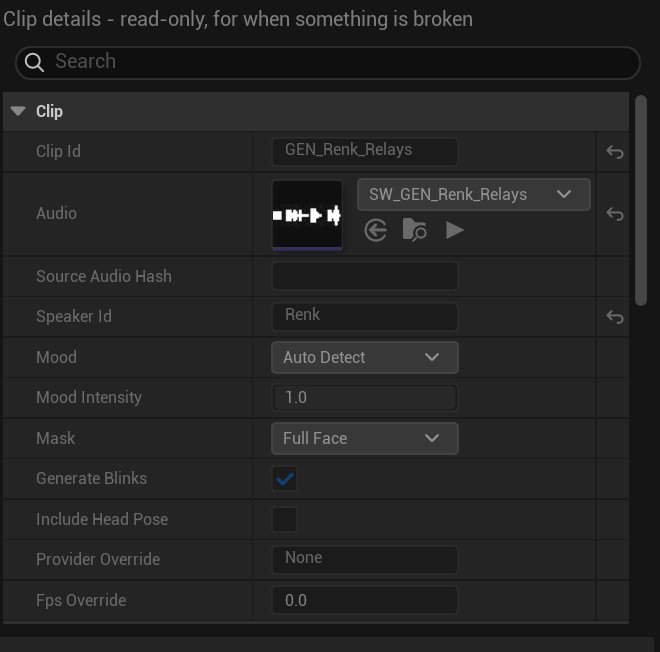
Clip
A clip’s settings: mood on auto detect, intensity, a full-face mask, blinks on, head pose off
ClipMood, intensity, blinks and head pose, set per line or left to the voice.
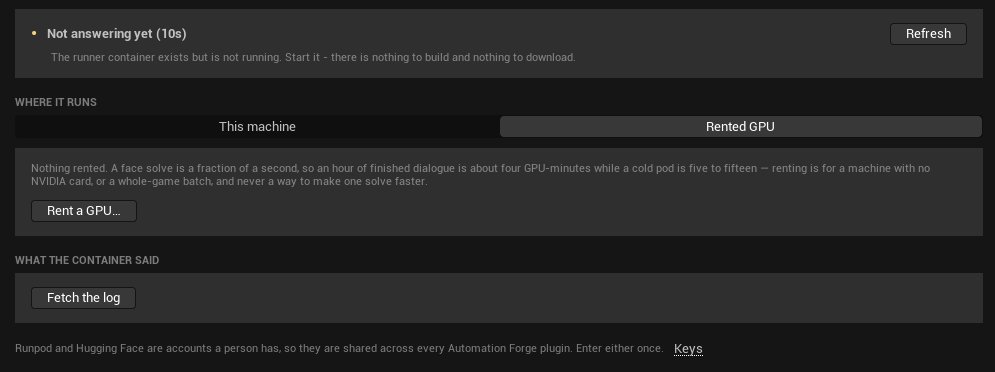
Audio2Face runner
The Audio2Face runner window: where it runs, this machine or a rented GPU
Audio2Face runnerACE runs on your own NVIDIA card, or on a GPU you rent by the hour.

What you can do with it

NeutralAnger
FaceForge

Emotion, read or asked for.

The same line, the same voice, another mood.

Leave the mood on auto and the face follows how the line was read. Or ask for anger, joy or fear, and set how strong. Both faces here come from the same recording of the same line, neutral on the left and angry on the right, and the lip sync is the same in both.

FaceForge

One line, every character.

Each face from its own voice.

Three characters say the same line, each in their own voice, and each face is solved from what it hears. Two MetaHumans and a head under armour: FaceForge does not care whose face it is. Before a bake, a coverage check tells you which parts of a face the animation can move.

FaceForge

See it in a scene.

No dialogue system needed.

Every face on this page plays in a plain Sequencer scene: the voice lines on an audio track, the faces on the characters, the cameras cut to the lines. FaceForge’s skills set that scene up for you, so you can hear and see a dialogue without Narrative Pro or any other dialogue system.

FaceForge

A whole scene in seconds.

Line, solve, face.

Point a face bank at a scene’s lines and solve them all at once. Our test solved 26 lines on the processor in about 35 seconds, and each bake takes milliseconds. Every animation is as long as its audio to within a frame, so the mouth never drifts from the voice.

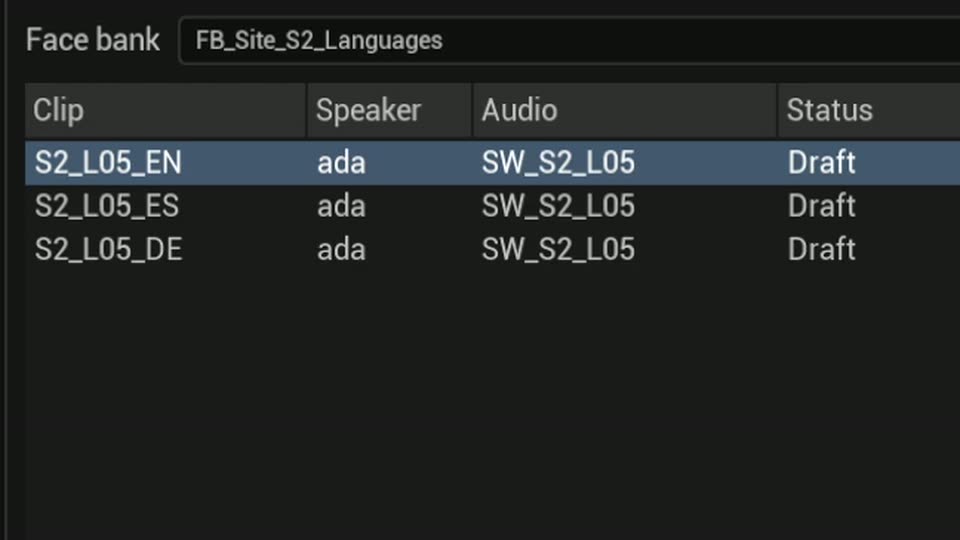
  1. Face Bank
    The Face Bank list: one line in English, Spanish and German, each a draft
    1

    The lines come in

    From a SpeechForge bank, an actor’s takes, or any sound in your project.

  2. Face Bank
    2

    Solve the bank

    One click solves every line, then bakes them to animations.

  3. Preview
    3

    Play it on a face

    Check each line with its voice before it goes on a character.

FaceForge

Every language, the same face.

English, Spanish, German.

Translate a line and the mouth follows the new words. Solve the translation onto the same face, or the mouth only, so the performance you approved stays and just the lips change language.

English
Español
Deutsch
FaceForge

Voices from SpeechForge.

Write the line, voice it, translate it.

SpeechForge writes and voices the scene, and translates the whole bank in one step with the same cast. FaceForge reads its lines straight from the bank, so a new language is a new solve, not a new setup.

FaceForge

Fix it by hand, keep the fix.

Your keys survive a better solve.

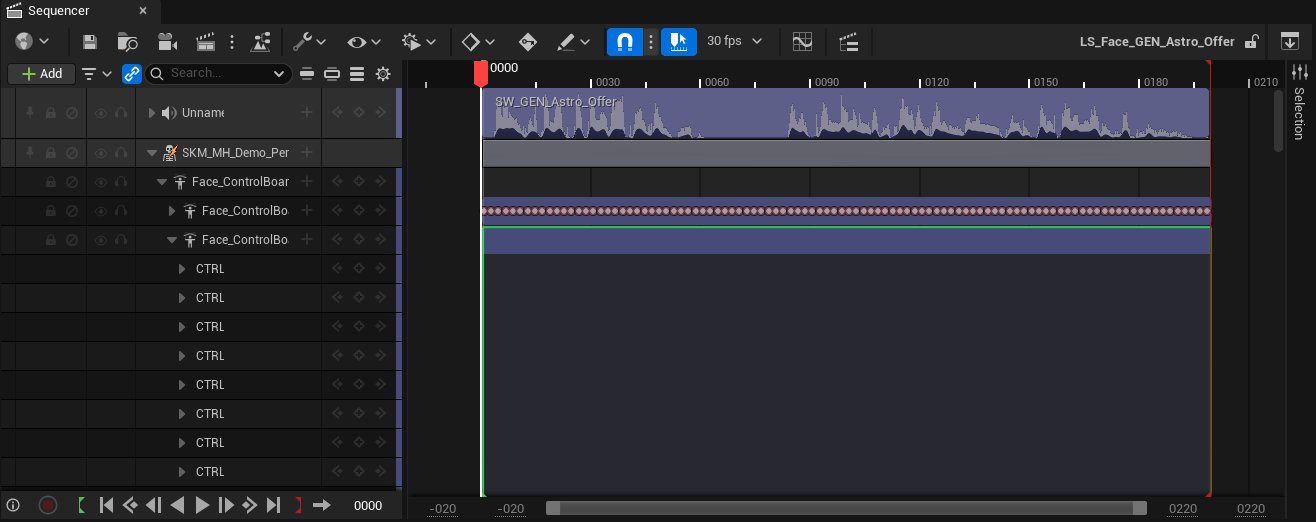
Open a line in Sequencer and key the face board over the solve. Your correction comes back as a layer of its own, so the mouth can be solved again underneath it, with another engine or in another language, and the hand work is still there. A take recorded with PerformanceForge joins the same way: its brows and eyes as one layer, the mouth from the final audio as another.

The panel
Sequencer
A correction sequence: the line’s audio over the face board, with an empty layer on top for hand keys

Works with these characters

FaceForge works on the characters you already have.

Not only MetaHuman: any face built on the same standard shapes.

MetaHuman

The full MetaHuman face rig, from Unreal’s own solver or ACE.

Character Creator

CC5 runs on the MetaHuman rig, so it takes MetaHuman face curves or the 52 ARKit shapes. Earlier versions use the 52 ARKit shapes. Shown in our public video.

Daz 3D

Genesis characters exported with the 52 ARKit face shapes.

Any ARKit head

Ready Player Me, your own sculpt: any head with the 52 ARKit shapes. ACE speaks ARKit directly; the MetaHuman solver’s curves are converted to ARKit by our own mapping, which you can tune. The coverage check shows what a head can move before you bake.

What it needs

Unreal Engine 5.8

Everything runs inside the editor.

An engine to solve with

FaceForge MetaHuman uses Unreal’s own solver on the processor, with no account. FaceForge ACE needs an NVIDIA card and Docker, or a GPU you rent on your own Runpod account.

A face that can move

A MetaHuman, or a head with ARKit-style blend shapes, as most Character Creator, Daz and Ready Player Me heads have.

Voice lines

From SpeechForge, from your actors, or any sound wave in your project.

Price

Free

FaceForge and both of its engines are free. ACE runs on your own graphics card, or a GPU you rent by the hour.

Beta · v0.2.3

In the Hub

The free Hub installs FaceForge and its add-ons, keeps them up to date, and gets new versions to you first.

FabComing soon on Fab, as part of the Storytelling bundle: PerformanceForge, SpeechForge and FaceForge. A Fab product has to stand on its own, so tools that work together go there as one.

This tool is free. If it saved you time, you can support its development.

Support Kovati →

Questions

Asked before you start.

MetaHumans can already be animated from a voice. Why FaceForge?+

They can, and FaceForge MetaHuman uses that same Epic solver, so the quality is the same. FaceForge is everything around it. You choose the engine: Epic’s, NVIDIA ACE when you want an emotion you can ask for, or a rented GPU for a whole game. It works on a whole dialogue at once, every line of a scene from a bank, not one clip at a time. It takes its lines straight from SpeechForge and its performances from PerformanceForge. Your hand corrections stay as their own layer. Translations solve onto the same face, or mouth only, so the performance you approved stays and only the lips follow the new language. And everything bakes to standard animations and montages you can play anywhere, on MetaHumans and on ARKit heads.

Do I need Narrative Pro or a dialogue system?+

No. Every scene on this page plays in a plain Sequencer sequence. FaceForge bakes standard animations, and its skills put the lines and faces into a sequence for you. Using Narrative Pro? An add-on puts the faces on every dialogue in one pass.

Which engine should I use?+

Start with FaceForge MetaHuman: it ships inside Unreal, runs on any machine and needs no account. Add ACE when you want emotion you can ask for, faster batches on an NVIDIA card, or a head that speaks ARKit blend shapes, which ACE drives with no mapping at all.

Does it only work with MetaHuman?+

No. It bakes to the 52 ARKit shapes most authored heads use, and to MetaHuman faces. The coverage check tells you, before you bake, how much of your character’s face it can move.

What does renting a GPU cost?+

What the provider charges, on your own account. Our test ran on an L40S at $0.79 an hour, about ten cents for the run. A line solves in a fraction of a second, so renting is for a machine with no NVIDIA card or a whole game at once, and you stop the pod when you are done.

How does the face play in my game?+

Each line bakes to a standard animation and montage on the character’s face. Play it in a Sequencer scene, from your Blueprints, from your dialogue system, or with the free line player when it arrives.

Is it finished?+

It is in beta. The voice drives the mouth and the face; it does not aim the eyes.

Do I have to use AI?+

No. Every step works by hand. AI and agents are there when you want a first draft or want the repetitive work done for you.

What does it cost?+

You start with the free tools. Some tools, add-ons and kits are paid, and you see the price before you buy. Pro, for teams, is a subscription.

Can I ship what I make in a commercial game?+

Yes. What you make is yours. AI providers have their own terms, and each add-on that uses one says which.

Which version of Unreal do I need?+

Unreal Engine 5.8.

Your first scene is free to put on a face.